.webp)

.svg)
Amazon Brand Store: architecture, SEO and conversion design
Without a Brand Store, your Sponsored Brands run at half power
Most brands launching Sponsored Brands send the traffic to a generic category page or to an isolated product listing. That is a waste. Sponsored Brands is the only format that can route traffic to a dedicated Brand Store: a mini-site on Amazon that you control entirely in terms of design, content and product hierarchy.
A well-built Brand Store gives you two things an isolated product page cannot: a brand narrative (your values, your categories, your best seller of the moment) and the ability to present several coherent products in a single visit. Average basket rises. Cost of acquisition per product falls mechanically. For the brand work that comes before the Brand Store, see 7 mistakes that destroy an e-commerce brand.
Here is how we build a Brand Store that genuinely serves Sponsored Brands, and the patterns we see most often in audits.
The architecture we recommend
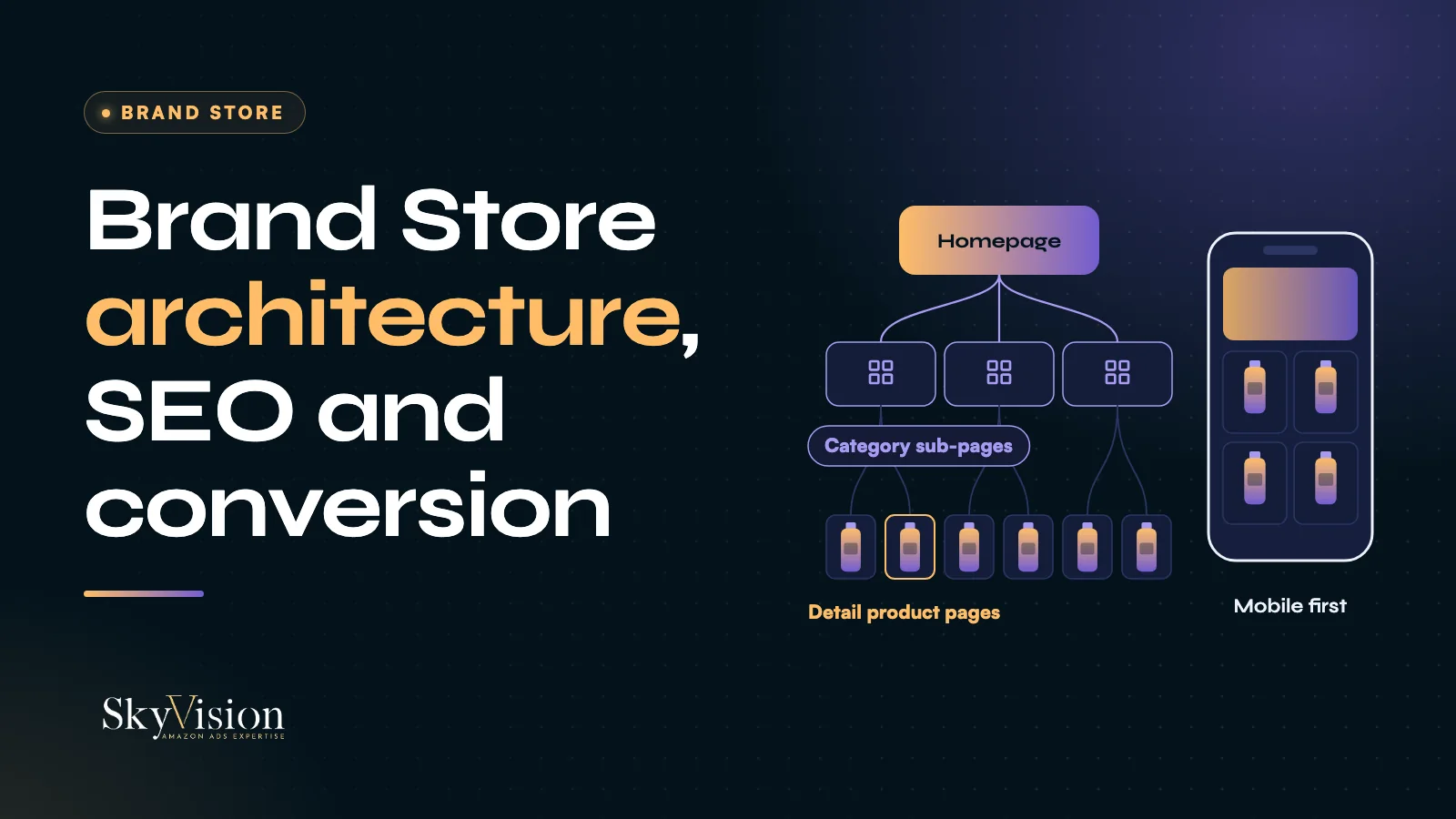
Three levels. No more, no fewer.
The homepage. This is your shop window. It has to do three things in four seconds: show the brand (logo, claim, differentiating value), present the main product categories (three to six at most), and push the current best seller in a hero banner with a direct call to action. The classic mistake is overloading the homepage with twelve products, a 90-second video and dense marketing copy. The result is friction and a bounce.
The category sub-pages. One per product category or per use case, for a beauty brand, for instance: face care, body care, supplements. Each sub-page presents four to eight products at most, grouped by benefit or by audience. Avoid sub-pages that list the whole catalogue. A curated sub-page with four products converts better than one stacking twenty.
The detail product pages. For your hero products, create a dedicated page inside the Brand Store with enriched content: a demo video, a comparison against the alternative, ingredients, instructions, a FAQ. This page is not redundant with your standard Amazon listing. It adds the brand context the standard listing cannot carry.
Brand Store SEO, routinely ignored
Many sellers do not realise the Brand Store is indexed. It appears in Amazon search results on some branded queries, and it is crawled by Google. Three levers to activate.
The Brand Store meta tags. Every page of your Store has a meta title and a meta description you fill in from the Store Builder. Too many brands leave those fields at their default, along the lines of "Brand X: Amazon". Fill them with your main keyword plus a differentiating claim. "Biotin and collagen supplements (Brand X" beats "Brand X) Amazon".
Keywords in the copy. The text content of your Brand Store (section titles, category descriptions, hero intro) is read by Amazon's algorithm for internal ranking. Work your five to ten main keywords naturally into the sub-page copy. No keyword stuffing: Amazon penalises it.
A clean hierarchical structure. A hierarchical URL (homepage, category sub-page, product page) signals your brand structure to Amazon and to Google. A flat structure, everything on the homepage, captures no long-tail ranking.
Conversion design, mobile first
On Amazon accounts in Europe, most Brand Store traffic comes from mobile. A desktop-optimised design that falls apart on a phone costs conversion. Four principles we apply systematically.
An explicit call to action per product. Every product card needs a clearly identifiable button: "View product", "Add to basket". Avoid purely decorative cards with no button: the user does not know what to do.
A clear visual hierarchy. The hero banner should dominate the first screen. The current best seller should be identifiable at a glance. Other products follow in a regular grid. Avoid asymmetric compositions that scatter the eye.
High-quality images at the right size. Amazon recommends at least 1200x600 pixels for hero images and 600x600 for product cards. Below that they pixelate on mobile and signal a lack of care. A blurred image halves conversion immediately.
Design mobile first. Build the sub-page for mobile first (one column, hero visible immediately, calls to action within thumb reach) then adapt for desktop. The reverse produces sub-pages that look beautiful in the Builder preview and are unreadable on a phone.
Tracking: Brand Store Insights, free and underused
Amazon provides Brand Store Insights free to any brand enrolled in Brand Registry. It is a rich source that most brands never open. Four things worth looking at.
Visits per page. Identifies the sub-pages that capture traffic, which you should scale, and the ones that are dead, which you should remove or rebuild.
Traffic sources. Breaks down what comes from Sponsored Brands, from organic Amazon links, from external traffic such as Google and social, and from in-store search. If your external share is low, you are leaving Google SEO on the table.
Sales attributed to the Brand Store. Lets you measure revenue generated by the Brand Store against revenue generated by isolated product listings. This is the figure that justifies the design investment.
Best-performing sub-pages. Identifies what converts, so you can reorganise the homepage around what works rather than around what you assume works.
To go further on measuring real incrementality, beyond Brand Store Insights, see our Amazon Marketing Cloud guide.
The five patterns we see in audits
The brochure Brand Store. Eighty per cent brand imagery, twenty per cent visible products. Conversion is dreadful. Invert the ratio: seventy per cent clickable products, thirty per cent brand content.
The homepage saturated with products. The opposite failure, and just as bad. Fifteen or twenty products with no hierarchy and the user gives up. Cut back to one hero, four categories and six best sellers at most.
Identical sub-pages across categories. All built on the same template with the same products. No differentiation at all. Each sub-page needs its own angle (use case, audience, benefit) and different products.
No seasonal refresh. The Brand Store sits frozen all year. Same hero, same products, in January and in June. Refresh the hero and the best seller every quarter at minimum, plus a seasonal refresh for Prime Day, Black Friday, Christmas and back to school.
No link to Sponsored Brands. The Sponsored Brands campaigns point at the main product listing instead of the Brand Store, so the Store gets almost no advertising traffic. Configure each Sponsored Brands campaign with the Brand Store as its destination, on the sub-page matching the targeted collection.
A concrete case: Polar
On the Polar account (former client, 11 countries, Amazon advertising and DSP), ROAS went from 13.84 to 17.33 in 2025 compared with 2024, on a budget down 32%. The account combines Sponsored Products, Sponsored Brands, Sponsored Display and DSP. This result is not tied to the Brand Store or to one specific format: it belongs to that whole set, DSP included.
Results from a real client case. Past performance does not guarantee future results. Outcomes vary by catalogue, budget, category and competition.
When to rebuild it
Three signals that it is time to redo your Brand Store.
Your Brand Store conversion is well below your product listing conversion. The design or the structure is not working.
Your catalogue has changed by more than 30 per cent since the last rebuild. You have added categories and retired products. The Brand Store no longer reflects what you sell.
You activated Sponsored Brands without rebuilding the Brand Store alongside. The campaigns send traffic to an outdated Store, and return plateaus mechanically. See also our seven mistakes that cap return on ad spend.
Questions we get asked
What does a Brand Store cost on Amazon?
The tool itself is free to any brand enrolled in Brand Registry. The real cost is the design, in-house or through an agency, and the production of the visual assets: product photography, video, illustration. For a serious full rebuild, allow two to six weeks of production.
Who can create a Brand Store?
Any brand enrolled in Amazon Brand Registry, seller or vendor. Brand Registry enrolment is free but requires a registered trademark. Allow four to eight weeks to complete the enrolment.
Does a Brand Store replace product listings?
No. Individual product listings remain the main conversion channel, through Amazon organic search, Sponsored Products and direct purchase. The Brand Store complements them by capturing Sponsored Brands traffic and presenting the brand as a whole.
How many sub-pages should I plan?
Three to six at most. Beyond that the user gets lost in the navigation. One sub-page per main product category, or per use case, or per audience segment.
How do I know whether my Brand Store is performing?
Three things to look at in Brand Store Insights: conversion rate, the share of Amazon revenue attributable to the Store, and the share of external traffic. The free audit identifies the priority fixes: book the audit.
The last word
A Brand Store is not a marketing bonus. It is the central asset of your Sponsored Brands strategy. A three-level architecture, real SEO work, a mobile-first design, tracking through Brand Store Insights, and a quarterly refresh. Five levers that turn a dormant Store into a conversion engine.
For an audit of your current Brand Store with costed recommendations within about a week: book the free audit. See also our Sponsored Products and Brands offer and our approach.


